Note
Access to this page requires authorization. You can try signing in or changing directories.
Access to this page requires authorization. You can try changing directories.
When you deploy Microsoft Fabric, you need to decide how to structure capacities, workspaces, and items across your organization. The right deployment pattern depends on your requirements for governance, security, performance isolation, and cost management. This guide helps architects and platform teams evaluate four deployment patterns and understand the considerations and trade-offs for each one.
Four-level hierarchy
The following diagram shows the four-level hierarchy that defines all Fabric deployments.

Download a Visio file of this architecture.
The deployment hierarchy flows from your Microsoft 365 tenant down to individual items. Your choice of deployment pattern determines how you use each level.
Tenant level. At the top is your Microsoft 365 tenant, which serves as the identity and administrative boundary for your organization. Your Fabric tenant exists within this Microsoft 365 tenant, and all Fabric resources are located within this single tenant boundary. Tenant-level settings, including Microsoft Entra Conditional Access, private links, and sensitivity labels, apply across all capacities and workspaces.
Capacity level. Set up at least one Fabric capacity within a Microsoft 365 tenant. Each capacity is bound to a specific Azure region and has a specific F SKU that determines available compute resources measured in capacity units (CUs). Capacities control data residency and provide billing boundaries. A single capacity can host multiple workspaces.
Workspace level. Each capacity contains one or more workspaces. Workspaces are the primary containers for collaboration and governance. They define access control through four workspace roles (Administrator, Member, Contributor, and Viewer), support Git integration for version control, and serve as the scope for deployment pipelines. A workspace belongs to one capacity at a time. Same‑region capacity migration is straightforward. Cross‑region migration is possible, but you must remove and re-create most Fabric items, including lakehouses, warehouses, notebooks, and pipelines. Therefore, prefer same‑region migration.
Item level. Workspaces contain Fabric items such as lakehouses, warehouses, notebooks, pipelines, semantic models, reports, and dashboards. Items inherit workspace permissions by default. Microsoft OneLake security roles provide granular access control at the table, folder, column, and row level, but they apply only to users in the Viewer role. Workspace admins, members, and contributors bypass OneLake security roles.
The following licensing and workspace-type constraints often determine which deployment pattern is most practical:
New workspaces start on shared capacity unless you reassign them. Every tenant has a shared capacity that hosts My Workspaces and can host Power BI Pro or Premium Per User (PPU) workspaces. To implement a governed Fabric deployment pattern for production workloads, you typically need to reassign workspaces to a dedicated Fabric capacity in the tenant.
PPU isn't a substitute for Fabric capacity. PPU provides Power BI Premium features on a per-user basis, but it doesn't include Fabric capacity. To create or run non-Power BI Fabric items such as lakehouses, warehouses, and notebooks, you need an F capacity.
Workspace type affects what the pattern can host. The Fabric deployment patterns in this article assume F SKU-backed Fabric workspaces. A and EM SKUs support only Power BI items, so they can't support end-to-end Fabric deployment patterns.
Power BI viewer licensing can change the cost of a pattern. On F64 and larger capacities, users with the Viewer role can access Power BI content with a free license. On smaller capacities, Power BI consumers need a Pro, PPU, or trial license. This threshold can reduce the cost effectiveness of a centralized pattern for large reader populations.
Power BI authoring and sharing requires at least one Pro or PPU user. Even if a workspace uses Fabric capacity, organizations need users with Pro or PPU licenses to create and share Power BI items.
Components
Microsoft 365 tenant: An identity and administrative boundary for your organization. It hosts Microsoft Entra ID (formerly Azure Active Directory) for authentication and authorization.
Fabric capacity: A compute and billing resource used in a specific Azure region, for example East US or West Europe. To reduce costs, you can pause capacities when not in use.
Fabric workspace: A collaboration container for Fabric items. It supports role-based access control (RBAC), Git integration, and deployment pipelines. For logical grouping, you can assign workspaces to Fabric domains.
Fabric items: Data and analytics artifacts such as lakehouses, data warehouses, notebooks, pipelines, dataflows, semantic models, reports, and dashboards.
Fabric domains: Logical groupings that organize workspaces by business unit or subject area. Domains support delegated governance and appear in the OneLake catalog for discovery and oversight.
OneLake: A unified, hierarchical data lake where tenants contain workspaces, which contain items. Fabric stores data in OneLake. OneLake supports Azure Data Lake Storage APIs, shortcuts to external storage, and integration with Data Lake Storage tools, such as Azure Storage Explorer and AzCopy.
OneLake catalog: A centralized interface to find, govern, and secure Fabric data across the tenant. Users can access the catalog by using tools like Microsoft Teams, Excel, and Microsoft Copilot Studio.
Understand Fabric deployment levels
Your organization's structure, objectives, security requirements, scale, governance model, and application life cycle influence decisions at each deployment level. For more information about each level, see Four-level hierarchy.
Capacities control data residency and geographic distribution. Organizations that operate in multiple geographic locations can use capacities in different Azure regions to control where data is stored. Each capacity is bound to a specific Azure region, which supports multiple‑geographic deployments across regions. To support centralized governance, Fabric domains can group workspaces and their associated capacities across regions.
Workspaces serve as the primary governance and security boundary. Each workspace defines access control through four roles, supports version control through Git integration, and serves as the scope for deployment pipelines. To centralize collaboration and content discovery, use the OneLake catalog to implement a unified discovery and governance experience over the tenant's OneLake data. Users can find and interact with content from tools like Teams and Excel through this catalog.
Each level influences application life cycle choices. Features such as deployment pipelines and life cycle management aren't available in single-workspace patterns because they require separate workspaces. Organizations that use domains to group workspaces can delegate domain-level administration without tenant-administrator privileges, which affects how teams manage releases and governance across business units.
Common patterns across all deployments
All Fabric deployment patterns share the following foundational characteristics:
Workspaces as boundaries for scale, governance, and security. Deployment patterns use Fabric workspaces as the primary unit for item organization, permissions, and DevOps feature scope. Regardless of which pattern you choose, workspaces define the boundary for collaboration and access control.
Fabric domains for delegation across multiple workspaces and business units. Use Fabric domains for delegation. You can manage multiple workspaces that might belong to the same business unit, or manage data that belongs to a business domain and spans more than one workspace. To manage and govern data at the domain level, you can adjust tenant-level settings and use a domain-specific configuration for those settings.
Capacities for compute scaling with dedicated capacity per workspace for performance guarantees. If you must meet specific performance levels, use Fabric capacities to scale compute resources and offer dedicated capacities per workspace. Organizations that need workload isolation for performance-sensitive jobs can assign those workspaces to a separate capacity that has a guaranteed CU allocation.
OneLake catalog for asset discovery and the Secure tab for data security policies. To promote discovery and the use of data assets across your tenant, use the OneLake catalog. To view, monitor, and configure security roles across workspaces and items, use the Secure tab in the OneLake catalog.
Extension to Microsoft Cloud features if native Fabric features are unavailable. If a native feature isn't available, deployment patterns can extend to use equivalent features from the Microsoft Cloud, such as Azure and Microsoft 365. For example, organizations can use Azure Pipelines or GitHub Actions for continuous integration and continuous delivery (CI/CD) orchestration if Fabric deployment pipelines don't cover their cross-workspace automation requirements. Organizations can also use Microsoft Purview for enterprise-wide data governance that spans Fabric and non-Fabric data sources.
Select a deployment pattern
The following scenarios describe common business requirements and the deployment patterns that address them. Use these scenarios to help identify the pattern that best fits your organization.
Scenario 1: Faster time to market with cross-team collaboration. If your organization wants faster time to market, cross-team collaboration, and lower restrictions on data usage, you can implement a monolithic deployment pattern. In this scenario, your organization operates in and manages a single workspace.
Scenario 2: Isolated team environments with central infrastructure management. If your organization wants to provide isolated team environments and a central infrastructure management team, you can implement multiple workspaces that use either a shared capacity or separate capacities. This scenario also suits organizations that want to implement a data mesh architecture.
Use Pattern 2: Multiple workspaces, single capacity or Pattern 3: Multiple workspaces, separate capacities.
Scenario 3: Full business-unit autonomy over data platforms. If your organization wants an entirely decentralized model that gives business units or teams the freedom to control and manage their own data platforms, you can implement a deployment model that uses either separate workspaces with dedicated capacity or multiple Fabric tenants.
Use Pattern 3: Multiple workspaces, separate capacities or Pattern 4: Multiple Fabric tenants.
Scenario 4: Hybrid approach that combines multiple patterns. If your organization wants a hybrid solution that uses multiple patterns to meet its requirements, you can implement a hybrid approach. For example, you might set up a single workspace for specific business units, like in a monolithic deployment pattern, and separate, dedicated workspaces and separate capacities for other business units.
Pattern 1: Monolithic deployment
In this deployment pattern, you allocate one workspace for all use cases. All business units work within the same workspace.

The following characteristics apply to this pattern:
Fabric items share the same capacity. The time that a query or job takes varies, depending on the other workloads that use the same capacity.
Workspace maximum CUs are limited to the largest possible F SKU. For data engineering and data science experiences, capacity administrators can configure Autoscale Billing for Apache Spark to move the compute capacity that the Spark Engine uses outside of the allocated CUs.
Features that are scoped to a workspace apply across all business units that share the workspace.
All workspace items and data are in one region. You can't use this pattern for multiple-geographic scenarios.
Features that rely on multiple workspaces aren't available, for example deployment pipelines and life cycle management.
Single-workspace limitations apply.
Specific SKU capacity limitations apply.
When to use this pattern
You might implement this deployment pattern if:
Your organization doesn't have complex engineering requirements, it has a small user base, or it has small semantic models.
Your organization operates in a single region.
You're not primarily concerned with organizational separation between business units.
Your organization doesn't require workspace-scoped features, such as sharing code repositories with Git.
You want to implement a lakehouse medallion architecture. If your organization uses a single workspace, you can create separate lakehouses within the workspace to manage bronze, silver, and gold layers.
Your organization's business units share roles, and you can have the same workspace-level permissions for users in the workspace. For example, if multiple users from different business units are administrators of a single workspace, they have the same rights on all items in the workspace.
Your organization tolerates variable job completion times. If a capacity is shared, users can run queries at any time. The number of CUs available to run a job depends on the other queries that run on the capacity, which can lead to variable job completion times.
Your organization can meet its CU business requirements by using a single Fabric capacity.
Design area considerations
The following table presents considerations that might influence your decision to use this deployment pattern.
| Aspect | Considerations |
|---|---|
| Governance | Lower governance mandates and restrictions on the platform are required. Suits smaller organizations that prefer faster time to market. Challenges might develop if governance requirements become more complex. |
| Security: Data plane | Data can be shared across teams, so you don't need to restrict data between teams. Teams have ownership rights on semantic models. They can read, edit, and modify data in OneLake. |
| Security: Control plane | All users can collaborate in the same workspace. There are no restrictions on items. All users can read and edit all items. |
| Administration | Lower administration costs. No need to track and monitor access and usage per team. Less stringent Fabric workload monitoring across teams. |
| DevOps | A single release for the entire platform. Simpler release pipelines. |
| Usability: Administrators | Fewer items to manage. No need for other setup or to handle requests from teams for new capacities or workspaces. Capacity administrators can be tenant administrators, so you don't need to create or manage other groups or teams. |
| Usability: Other roles | Workspace sharing is acceptable. Collaboration among users is encouraged. |
| Performance | Workload isolation isn't mandatory. You don't need to meet strict performance-based service-level objectives (SLOs). Throttling is possible when workloads compete for the same shared CUs. This pattern suits organizations with low concurrency or predictable workloads. |
| Billing and cost management | One team can handle costs. No need to chargeback to different teams. |
Pattern 2: Multiple workspaces, single capacity
In this deployment pattern, you allocate multiple workspaces on a single shared capacity. Workspaces share that capacity, so concurrent workloads can affect the performance of jobs and interactive queries.

The following characteristics apply to this pattern:
Fabric items share the same capacity. The time that a query or job takes varies, depending on the other workloads that use the same capacity.
Workspace maximum CUs are limited to the largest possible F SKU. For data engineering and data science experiences, capacity administrators can configure Autoscale Billing for Spark to move the compute capacity used by the Spark Engine outside of the allocated CUs.
Features that are scoped to a workspace apply across all business units that share that workspace.
All workspace items and data are in one region. You can't use this pattern for multiple-geographic scenarios.
You can use DevOps features that require separate workspaces, like deployment pipelines and life cycle management.
Single-workspace limitations apply.
Specific SKU capacity limitations apply.
When to use this pattern
You might implement this deployment pattern if:
You want a hub-spoke architecture that centralizes some aspects of analytics environment operation and decentralizes others.
You want variable operational and management decentralization. For example, your organization might host the bronze and silver layers of a medallion architecture in one workspace and host the gold layer in a separate workspace. This separation often reflects distinct operational responsibilities, for example where one team manages the bronze and silver layers and another team manages the gold layer.
You aren't primarily concerned about performance management and workload isolation.
Your organization doesn't need to deploy workloads across different geographical regions. All data must reside in one region.
Your organization might require separate workspaces because:
Members of the team that's responsible for workloads are in different workspaces.
You want to create separate workspaces for each type of workload. For example, you might create a workspace for data ingestion, like data pipelines, dataflows, or data engineering, and a separate workspace for consumption through a data warehouse. This design works well if separate teams are responsible for each workload.
You want to implement a data mesh architecture that groups one or more workspaces together in a Fabric domain.
Your organization might deploy separate workspaces based on data classification.
Design area considerations
The following table presents considerations that might influence your decision to use this deployment pattern.
| Aspect | Considerations |
|---|---|
| Governance | Medium governance mandates and restrictions on the platform are required. The organization needs more granular control to govern departments, teams, and roles. |
| Security: Data plane | Data restrictions are required, and you need to provide data protection based on access controls for departments, teams, and members. |
| Security: Control plane | To avoid accidental corruption or actions by malicious users, you might need to provide controlled access to Fabric items by role. |
| Administration | You don't need to manage capacities because it's a single-capacity model. You can use workspaces to isolate departments, teams, and users. |
| DevOps | You can do independent releases per department, team, or workload. It's easier to meet development, testing, acceptance, and production (DTAP) requirements for teams if you configure multiple workspaces to address each release environment. |
| Usability: Administrators | You don't need to allocate multiple capacities. Tenant administrators typically administer capacity, so you don't need to manage other groups or teams. |
| Usability: Other roles | Workspaces are available for each medallion layer. Fabric items are isolated per workspace, which helps prevent accidental corruption. |
| Performance | You don't need to meet strict performance SLOs. Throttling is acceptable during peak periods. |
| Billing and cost management | You don't have a specific requirement to chargeback per team. A central team is responsible for costs. Infrastructure teams are owners of Fabric capacities in the organization. |
Pattern 3: Multiple workspaces, separate capacities
In this deployment pattern, you allocate multiple workspaces across separate Fabric capacities, which provides governance and performance isolation between business units.
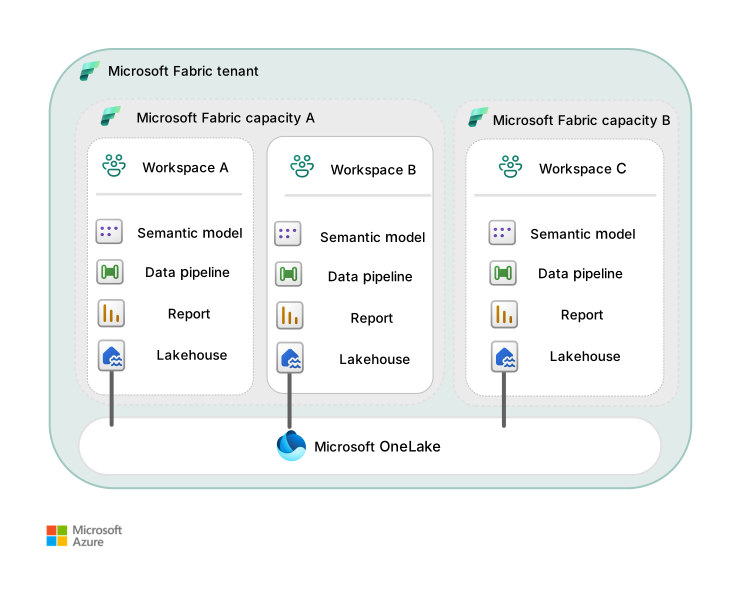
The following characteristics apply to this pattern:
The largest possible F SKU or P SKU that's attached to a workspace determines the maximum number of CUs that a workspace can use.
Separate workspaces create organizational and management decentralization.
Organizations can scale beyond one region by using capacities and workspaces in different geographical regions.
You can use the full capabilities of Fabric because business units can have multiple workspaces in separate capacities and grouped together through Fabric domains.
Workspace limitations for a single workspace apply, but you can create new workspaces to scale beyond these limits.
Specific SKU capacity limitations apply, but you can scale CUs by using separate capacities.
You can use the OneLake catalog to discover Fabric items and their certification statuses.
Domains can group workspaces together so that a single business unit can operate and manage multiple workspaces.
OneLake shortcuts eliminate physical copies of data to reduce data movement. OneLake shortcuts also offer controlled, cross‑workspace access through OneLake and don't transfer ownership of the underlying data.
When to use this pattern
You might implement this deployment pattern if:
Your organization wants to deploy architectural frameworks like data mesh or data fabric.
You want to prioritize flexibility in how you structure capacities and workspaces.
You operate in different geographical regions. In this case, create a separate capacity and workspace to move toward a multicapacity and multiworkspace deployment pattern.
You operate at a large scale and have requirements to scale beyond the limits of a single-capacity SKU or a single workspace.
You have workloads that must always finish within a specific time or need to meet performance-based SLOs. You can set up separate a Fabric capacity-backed workspace to meet SLOs for those workloads.
Design area considerations
The following table presents considerations that might influence your decision to use this deployment pattern.
| Aspect | Considerations |
|---|---|
| Governance | You have a high degree of governance and management, and you need independence for each workspace. You can manage usage per department or business unit. You can conform to data residency requirements. You can isolate data based on regulatory requirements. |
| Security: Data plane | You can control data access at the department, team, or user level. You can isolate data based on Fabric item type. |
| Security: Control plane | You can provide controlled access on Fabric items by role to avoid accidental corruption or actions by malicious users. |
| Administration | You restrict granular administrator capabilities to departments, teams, or users. You have access to detailed monitoring requirements on usage or patterns of workloads. |
| DevOps | You can isolate DTAP environments by using different capacities. Independent releases are based on department, team, or workload. |
| Usability: Administrators | You get granular visibility into usage by department or team. You delegate capacity rights per department or team to support scaling and granular configuration. |
| Usability: Other roles | Workspaces are available per medallion layer and capacity. Fabric items are isolated per workspace, which helps prevent accidental corruption. You have more options to prevent throttling caused by surges on shared capacity. |
| Performance | Performance requirements are high and workloads need to meet higher SLOs. You have flexibility in scaling up individual workloads per department or team. |
| Billing and cost management | You can meet cross-charging requirements by using dedicated capacities for each organizational entity, such as departments, teams, or projects. You can delegate cost management to respective teams to manage. |
Pattern 4: Multiple Fabric tenants
In this deployment pattern, all instances of Fabric are separate entities with respect to governance, management, administration, scale, and storage.
The following characteristics apply to this pattern:
Tenant resources are strictly segregated.
Management planes between tenants are separate.
Tenants are separate entities, each with its own governance and management processes and each administered independently.
You can use data pipelines or data engineering capabilities to share or access data between Fabric tenants.
When to use this pattern
You might implement this deployment pattern if:
Your organization has multiple Fabric tenants because of a business acquisition.
Your organization wants to set up a Fabric tenant specifically for a business unit or smaller subsidiary.
Evaluate alternative platforms
If your organization's requirements don't align with Fabric-based deployment models, consider the following constrained alternatives:
Azure Data Factory with either Data Lake Storage or OneLake, including hybrid Data Factory and Fabric architectures
Organizations that need explicit orchestration control or phased modernization can use Data Factory for ingestion and pipeline orchestration and Data Lake Storage as the storage foundation. In a hybrid model, Data Factory-managed data pipelines can load data into OneLake while Fabric manages the creation of analytical data assets. This approach supports incremental adoption of Fabric and preserves established integration patterns.
Data Lake Storage, Azure Databricks, and Power BI
Organizations that prefer a platform as a service (PaaS)-based architecture instead of a unified software as a service (SaaS) platform might build a data estate by using Data Lake Storage for storage, Azure Databricks for data engineering and analytics, and Power BI for semantic modeling and reporting. This approach offers maximum control and flexibility but requires increased integration effort and increases operational complexity and governance overhead.
Considerations
These considerations implement the pillars of the Well-Architected Framework, which is a set of guiding tenets that you can use to improve the quality of a workload. For more information, see the Well-Architected Framework.
The per-pattern tables earlier in this article use design areas that are specific to Fabric deployment decisions, like governance, security, administration, DevOps, usability, performance, and billing. The following subsections provide complementary guidance organized by Well-Architected Framework pillar. Use the per-pattern tables to compare patterns. Use these subsections for cross-cutting architectural guidance that applies regardless of which pattern you choose.
Reliability
Reliability helps ensure that your application can meet the commitments that you make to your customers. For more information, see Design review checklist for Reliability.
Built-in regional resiliency. Fabric provides built-in regional resiliency through availability zones, where supported. Fabric automatically distributes resources across multiple zones without customer configuration. Availability zone support varies by Azure region. To verify whether your target region supports availability zones for Fabric, see Fabric region availability.
Disaster recovery (DR) requires opt-in and has caveats. Cross-region recovery is available through an opt-in DR setting on the capacity settings page. Enable the DR capacity setting to replicate OneLake data across Azure paired regions by using asynchronous replication.
Important
Some Azure regions aren't paired with regions that support Fabric, which might compromise DR capabilities even if data is replicated. Because data replication is asynchronous, data written immediately before a regional disaster might be lost. For more information, see Reliability in Fabric.
Single-capacity patterns concentrate risk in one region. In patterns 1 and 2, workloads are in one Azure region. If the region experiences an outage, all workspaces are affected simultaneously. To protect against regional failure, configure the capacity setting to replicate OneLake data to a paired region. Plan for the recovery time needed to restore service in the paired region.
Multicapacity patterns provide natural regional isolation. In patterns 3 and 4, capacities in different regions mean a regional outage affects only the capacities in that region. Workloads in other regions continue to operate. These patterns support data residency requirements and provide the foundation for active-passive or active-active regional strategies.
Capacity pausing affects reliability. If you pause a Fabric capacity to reduce costs, all workloads on that capacity become unavailable. Consider the reliability effect before you pause a capacity that supports production workloads.
OneLake shortcuts introduce external dependencies. Shortcuts to external data sources introduce dependence on source availability. If the external source is unavailable, items that rely on shortcuts might fail. Monitor the health of external data sources and plan for graceful degradation.
Security
Security provides assurances against deliberate attacks and the misuse of your valuable data and systems. For more information, see Design review checklist for Security.
- The layered security model spans three levels. Fabric implements a layered security model that spans the tenant, workspace, and item levels. Your choice of deployment pattern determines how you segment security boundaries. Single-workspace patterns, like pattern 1, enforce uniform access. Multiworkspace patterns, like patterns 2, 3, and 4, support per-team or per-business-unit security boundaries.
Identity and access
Enforce tenant-level authentication policies by using Conditional Access. Use Conditional Access to enforce tenant-level authentication policies such as multifactor authentication, device compliance, and location-based restrictions. Conditional Access requires a Microsoft Entra ID P1 license.
Use workspace roles to control item access. Assign workspace roles to control who can create, edit, and consume items within a workspace. In multiworkspace patterns, like patterns 2, 3, and 4, use separate workspaces to enforce role boundaries between business units.
Apply granular data-level access by using OneLake security roles. Use OneLake security roles to apply granular access control at the table, folder, column, and row level for users in the Viewer role. Workspace administrators, members, and contributors bypass these roles.
Network security
Use private links for inbound traffic. Use private links to route inbound traffic over the Microsoft backbone instead of the public internet. Tenant-level private links apply to all workspaces. Workspace-level private links provide per-workspace granularity.
Use managed private endpoints for outbound Spark connections. Use managed private endpoints to secure outbound connections from Spark workloads to firewall-protected data sources, such as Data Lake Storage and Azure SQL Database.
Use virtual network data gateways when tenant-level private links block on-premises gateways. When you enable tenant-level private links, on-premises data gateways can't register. Use a virtual network data gateway instead of bridges that connect on-premises or virtual network-protected data sources.
Data protection
Apply sensitivity labels for end-to-end data classification. For data classification and protection, apply sensitivity labels from Microsoft Purview Information Protection to data that flows through Fabric. Labels follow the data from source to report.
Use audit logs and compliance tools for policy enforcement. To detect and respond to policy violations, review audit logs and use Microsoft Purview Compliance Manager.
Cost Optimization
Cost Optimization focuses on ways to reduce unnecessary expenses and improve operational efficiencies. For more information, see Design review checklist for Cost Optimization.
Model costs before you deploy. Deployment patterns affect your cost structure. Model costs for your scenario by using Fabric pricing and the Fabric capacity estimator.
Rightsize your capacity SKU. Rightsize your F SKU based on workload demand. Start with a smaller SKU and scale up as needed. Monitor consumption and identify over-provisioned or under-provisioned capacities by using the Fabric Capacity Metrics app.
Automate capacity pausing for nonproduction environments. Reduce costs by pausing F SKU capacities when they're not in use. In dev/test environments, pause capacities outside of working hours. Pausing makes all workloads unavailable, so consider automation through Azure Resource Manager Fabric APIs or scheduled pipelines.
Single-capacity patterns, such as patterns 1 and 2, centralize billing but limit chargeback. One capacity means one bill. Cost management is centralized, but chargeback to individual business units isn't possible because all workloads share the same capacity.
Multicapacity patterns, such as patterns 3 and 4, support per-team chargeback. Each capacity generates its own Azure billing meter. You can charge costs to the business unit responsible for each capacity. You can independently rightsize or pause each capacity based on the workload that it supports.
Manage OneLake storage costs independently. OneLake storage is billed at a pay-as-you-go rate per GB, and it doesn't consume CUs. Regularly delete unused data, including soft-deleted data, and monitor storage through the Fabric Capacity Metrics app.
Monitor Spark compute separately. For data engineering workloads, you can use separate Spark pools to move compute outside the CU budget. To avoid unexpected costs, monitor Spark CU consumption.
Operational Excellence
Operational Excellence covers the operations processes that deploy an application and keep it running in production. For more information, see Design review checklist for Operational Excellence.
Use deployment pipelines for staged promotion. Use Fabric deployment pipelines to promote content through dev/test and production stages. Deployment pipelines require separate workspaces, so they aren't available in pattern 1. In patterns 2, 3, and 4, create dedicated workspaces for each DTAP stage. Capacity strategy varies by pattern.
In pattern 2, all DTAP workspaces share the same capacity, which is cost effective but doesn't provide performance isolation between environments.
In pattern 3, you can use dedicated capacities per environment for full isolation, or you can balance cost and isolation by using a shared capacity for dev/test with a separate production capacity.
Plan preproduction environments as a workspace-level design decision. Pattern 1 provides no preproduction separation because dev/test occurs in the production workspace. Pattern 2 supports separate development, testing, and production workspaces on one shared capacity, which suits functional validation but not production-like performance or resilience testing. Pattern 3 supports production-like preproduction validation through environment-aligned workspaces with capacity-level isolation. Pattern 4 involves separate tenants rather than workspace-level decisions. Each tenant can independently choose its own environment topology and doesn't need to match other tenants.
Connect workspaces to Git repositories for source control. In patterns 2 and 3, separate workspaces per team or workload align with standard branching strategies. In pattern 1, all teams share a single repository, which can create merge contention.
Monitor capacity and workload health. Use the Fabric Capacity Metrics app to monitor capacity consumption, like CU usage, throttling, and overages. You can access detailed telemetry about individual workloads by using workspace monitoring. In multicapacity patterns, like patterns 3 and 4, you can delegate monitoring to the team responsible for each capacity.
Delegate administration through Fabric domains. In patterns 2 and 3, delegate tenant settings and workspace management to domain-level administrators without tenant-administrator privileges by using Fabric domains. Pattern 1 can't use domains because all items are in one workspace.
Manage capacities by using infrastructure as code (IaC). Create and manage Fabric capacities by using Bicep or Terraform. Store infrastructure definitions in source control alongside application code.
Performance Efficiency
Performance Efficiency refers to your workload's ability to scale to meet user demands efficiently. For more information, see Design review checklist for Performance Efficiency.
Understand capacity sizing and throttling behavior. Each capacity has a fixed CU allocation determined by its SKU. If demand exceeds available CUs, Fabric applies throttling and queues requests. Monitor throttling events by using the Fabric Capacity Metrics app and scale up the SKU or distribute workloads across multiple capacities as needed.
Isolate performance-sensitive workloads on a dedicated capacity. In patterns 1 and 2, all workloads compete for the same CUs. An expensive query or data pipeline can degrade interactive query performance for other users. In patterns 3 and 4, you can isolate performance-sensitive workloads on a dedicated capacity with a guaranteed CU allocation.
Configure Spark pools for data engineering workloads. For data engineering workloads, use custom Spark pools to control minimum and maximum node counts and support autoscaling. Managed virtual networks disable starter pools, or prewarmed shared clusters, which increases session start time from seconds to between 3 and 5 minutes.
Place capacities close to data producers and consumers. In pattern 3, you can use capacities in regions close to data producers or consumers, which reduces cross-region latency. OneLake shortcuts can reference data in other regions, but cross-region reads incur latency and egress costs.
Apply workload-specific optimization techniques. Improve scan performance by using Z-Ordering and V-Ordering for lakehouses. For warehouses, optimize query patterns to read smaller batches. Reduce capacity load compared to Import mode by using Direct Lake mode for Power BI reports.
Capability matrix
The following tables summarize the key differences in the capabilities of each pattern.
Governance and administration
| Capability | Pattern 1: Monolithic | Pattern 2: Multiple workspaces, single capacity | Pattern 3: Multiple workspaces, separate capacities | Pattern 4: Multiple tenants |
|---|---|---|---|---|
| Governance complexity | Low | Medium | High | High |
| Per-department usage tracking | No | Limited 1 | Yes | Yes |
| Domain-based delegation | No | Yes | Yes | N/A 2 |
| Granular administrator delegation | No | Limited 1 | Yes | Yes |
| Data residency compliance | Single region only | Single region only | Multiregion | Multiregion |
| Regulatory data isolation | No | Limited 1 | Yes | Yes |
1 Workspaces provide some isolation, but all workspaces share a single capacity, which limits the granularity of usage tracking and administration.
2 Pattern 4 uses separate tenants rather than domains. Each tenant has its own administration model.
Security
| Capability | Pattern 1: Monolithic | Pattern 2: Multiple workspaces, single capacity | Pattern 3: Multiple workspaces, separate capacities | Pattern 4: Multiple tenants |
|---|---|---|---|---|
| Data plane isolation between teams | No | Yes | Yes | Yes |
| Control plane isolation (item-level access) | No | Yes | Yes | Yes |
| Workspace role boundaries between business units | No | Yes | Yes | Yes |
| Tenant-level security segregation | N/A | N/A | N/A | Yes |
DevOps and life cycle management
| Capability | Pattern 1: Monolithic | Pattern 2: Multiple workspaces, single capacity | Pattern 3: Multiple workspaces, separate capacities | Pattern 4: Multiple tenants |
|---|---|---|---|---|
| Deployment pipelines | No 3 | Yes | Yes | Yes |
| Git integration | Limited 4 | Yes | Yes | Yes |
| Independent releases per team | No | Yes | Yes | Yes |
| DTAP environment isolation | No | Yes | Yes (across capacities) | Yes (across tenants) |
3 Deployment pipelines require separate workspaces, which aren't available in a monolithic single-workspace pattern.
4 Git integration is available but all teams share a single repository, which can create merge contention.
Performance and scale
| Capability | Pattern 1: Monolithic | Pattern 2: Multiple workspaces, single capacity | Pattern 3: Multiple workspaces, separate capacities | Pattern 4: Multiple tenants |
|---|---|---|---|---|
| Workload isolation for performance | No | No | Yes | Yes |
| Multiple-geographic deployment | No | No | Yes | Yes |
| Scale beyond single SKU limits | No | No | Yes | Yes |
| Performance SLO guarantees | No | No | Yes | Yes |
| Throttling risk from shared capacity | High | High | Low 5 | Low |
5 Throttling risk is low if workloads are on dedicated capacities, but throttling can still occur within a single capacity if demand exceeds available CUs.
Billing and cost management
| Capability | Pattern 1: Monolithic | Pattern 2: Multiple workspaces, single capacity | Pattern 3: Multiple workspaces, separate capacities | Pattern 4: Multiple tenants |
|---|---|---|---|---|
| Centralized billing | Yes | Yes | No 6 | No |
| Per-team chargeback | No | No | Yes | Yes |
| Independent capacity pausing | N/A (single capacity) | N/A (single capacity) | Yes | Yes |
| Cost delegation to teams | No | No | Yes | Yes |
6 Each capacity generates its own billing meter, so billing is distributed across capacities rather than centralized.
Contributors
Microsoft maintains this article. The following contributors wrote this article.
Principal author:
- Amanjeet Singh | Principal Program Manager
Other contributors:
- Lorrin Ferdinand | Principal Consultant
- Holly Kelly | Principal Program Manager
- Gabi Muenster | Senior Program Manager
- Sarah Sasidharan | Senior Program Manager
To see nonpublic LinkedIn profiles, sign in to LinkedIn.
Next steps
- Fabric concepts and licenses
- Fabric workspaces
- Fabric domains
- What is OneLake?
- Fabric deployment pipelines
- Reliability in Fabric
- Fabric security overview