Note
Access to this page requires authorization. You can try signing in or changing directories.
Access to this page requires authorization. You can try changing directories.
Note
This feature is currently in public preview. This preview is provided without a service-level agreement, and isn't recommended for production workloads. Certain features might not be supported or might have constrained capabilities. For more information, see Supplemental Terms of Use for Microsoft Azure Previews.
Graph in Microsoft Fabric transforms structured data stored in OneLake into a modeled, queryable graph. Query the graph by using visual or GQL-based tools that run through a common engine to produce visual, tabular, or programmatic results.
This article describes the graph architecture and explains the end-to-end data flow from source to insights.
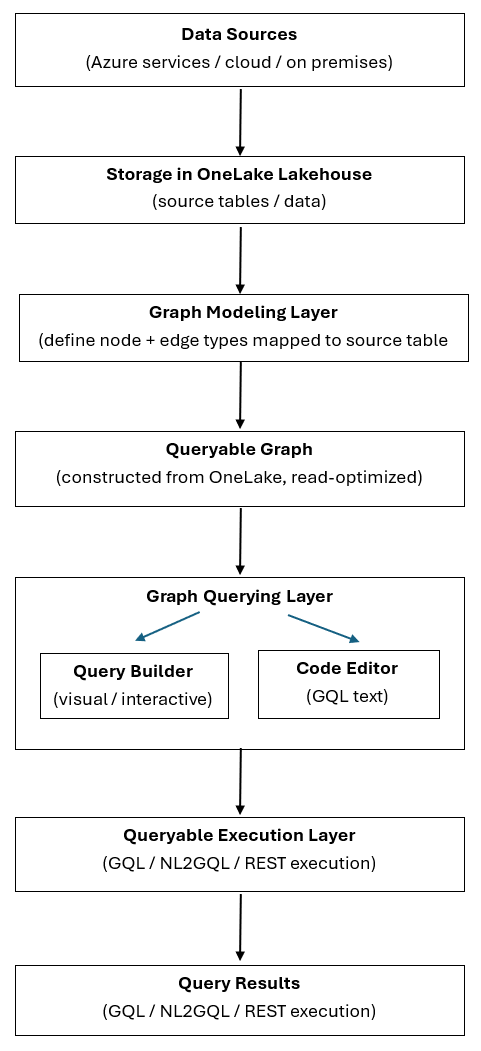
The following diagram illustrates the end-to-end data flow from source to insights:
Data sources
Data originates from external systems such as Azure services, other cloud platforms, or on-premises sources. Graph in Microsoft Fabric works with data from these sources after you ingest it into OneLake, where graph can read it.
Storage in OneLake
You store ingested data in OneLake as tabular source tables in a lakehouse. Graph ingests data from your lakehouse tables when you save the model, so you don't need to set up a separate ETL pipeline or move data to an external database.
Graph modeling
In the graph modeling step, you define the graph schema by specifying:
- Node types: Entities in your data, such as customers, products, or orders.
- Edge types: Relationships between entities, such as "purchases," "contains," or "produces."
- Table mappings: How node and edge definitions map to the underlying source tables.
This step creates the labeled property graph structure. Complete graph modeling before you query the graph. For guidance on making these modeling decisions, see Design a graph schema.
Note
Graph currently doesn't support schema evolution. If you need to make structural changes—such as adding new properties, modifying labels, or changing relationship types—reingest the updated source data into a new model.
Queryable graph
When you save the model, graph ingests data from the underlying lakehouse tables and constructs a read-optimized, queryable graph. This graph structure is optimized for traversal and pattern matching, which enables fast and efficient graph queries at scale.
Query authoring
You author queries against the queryable graph by using one of two experiences:
- Query Builder: A visual, interactive interface for exploring nodes and relationships without writing code. For more information, see Query the graph with the query builder.
- Code Editor: A text-based editor for writing GQL (Graph Query Language) queries. For more information, see Query the graph with GQL.
Both options target the same underlying graph. Choose the authoring experience that fits your workflow.
Query execution
You run queries through a common execution layer that supports:
- GQL: Queries the graph by using the international standard for graph query language (ISO/IEC 39075).
- Natural Language to GQL (NL2GQL) (preview): Translates natural language questions into GQL queries. Add graph in Microsoft Fabric as a data source in Fabric Data Agent to enable graph-powered AI reasoning. For details on how NL2GQL works, see the Graph-powered AI reasoning announcement.
- REST-based execution: Runs queries programmatically by using the GQL query API.
Tip
Choose your query path: Use GQL or REST for direct, programmatic access to graph data with full control over query structure. Use NL2GQL (preview) through Fabric Data Agent when you need natural language access — ideal for conversational AI and knowledge assistant scenarios.
This layer runs the query logic against the queryable graph and returns results.
Query results
Depending on how you query the graph, you receive results in one or more of the following formats:
- Visual graph diagrams: Interactive visualizations of nodes and relationships.
- Tabular result sets: Structured data in rows and columns.
- Programmatic responses: JSON output for REST or downstream consumption.
Explore results interactively, share them as read-only querysets, or use them in other tools and applications.